CSS
[CSS] 텍스트가 넘칠경우 생략해서 ... 보여주는 방법
메이플 🍁
2022. 8. 8. 21:08

<div>
  The brown fox jumps over the lazy dog.
</div>
div {
background-color: orange;
font-size: 30px;
padding: 20px;
}
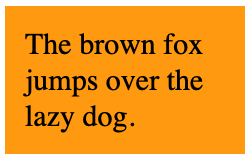
텍스트의 길이가 해당 요소보다 긴 경우에는 자동으로 줄바꿈이 일어난다
div {
  background-color: orange;
  font-size: 30px;
  padding: 20px;
  width: 200px;
}

white-space: nowrap 속성을 추가하면 자동으로 일어났던 줄바꿈이 일어나지 않고 텍스트가 요소 길이를 넘어선채 출력된다
div {
  background-color: orange;
  font-size: 30px;
  padding: 20px;
  width: 200px;
  white-space: nowrap;
}
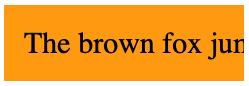
overflow: hidden 속성을 추가하면 요소 밖을 넘어섰던 텍스트가 숨겨진채로 출력된다.
div {
  background-color: orange;
  font-size: 30px;
  padding: 20px;
  width: 200px;
  white-space: nowrap;
  overflow: hidden;
}
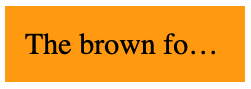
text-overflow: ellipsis 속성을 추가하면 생략기호 ...이 함께 출력된다.
div {
  background-color: orange;
  font-size: 30px;
  padding: 20px;
  width: 200px;
  white-space: nowrap;
  overflow: hidden;
  text-overflow: ellipsis;
}